Lab 4 — Microsoft Copilot Readiness
Understand where sensitive content exists across Microsoft 365 and how existing sharing permissions could increase risk before enabling Microsoft Copilot.
1. Review the Microsoft Copilot Readiness Dashboard
Analytics → SaaS Workflows → Microsoft Copilot Readiness Assessment
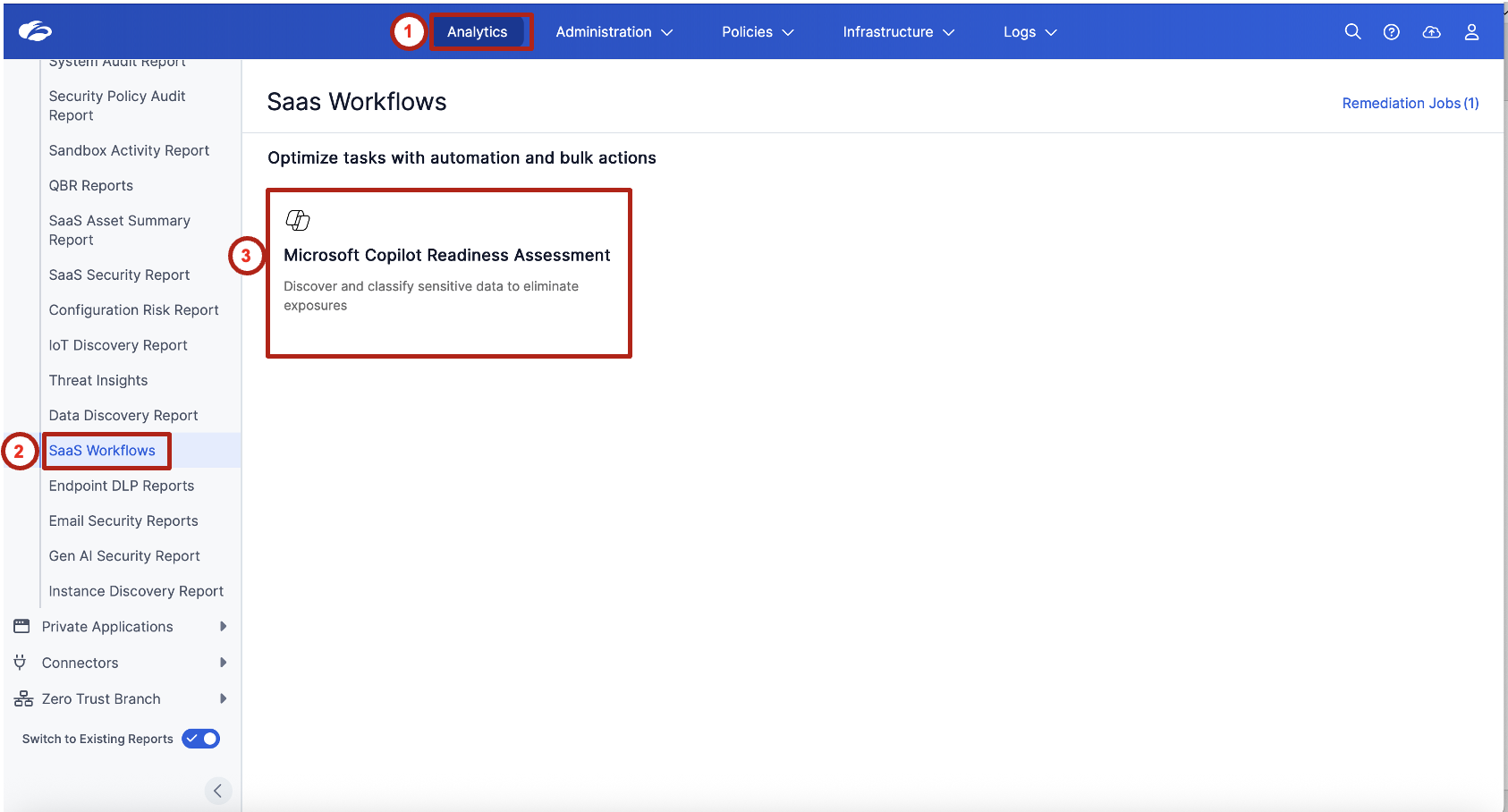
This is a read-only exercise. Review the data exposure posture only — do not modify any settings.
Review the summary tiles at the top of the page. Focus on:
- Total No. of Sensitive Assets
- Sensitive Assets Exposed Org-Wide
- Sensitive Assets Exposed with Specific Users
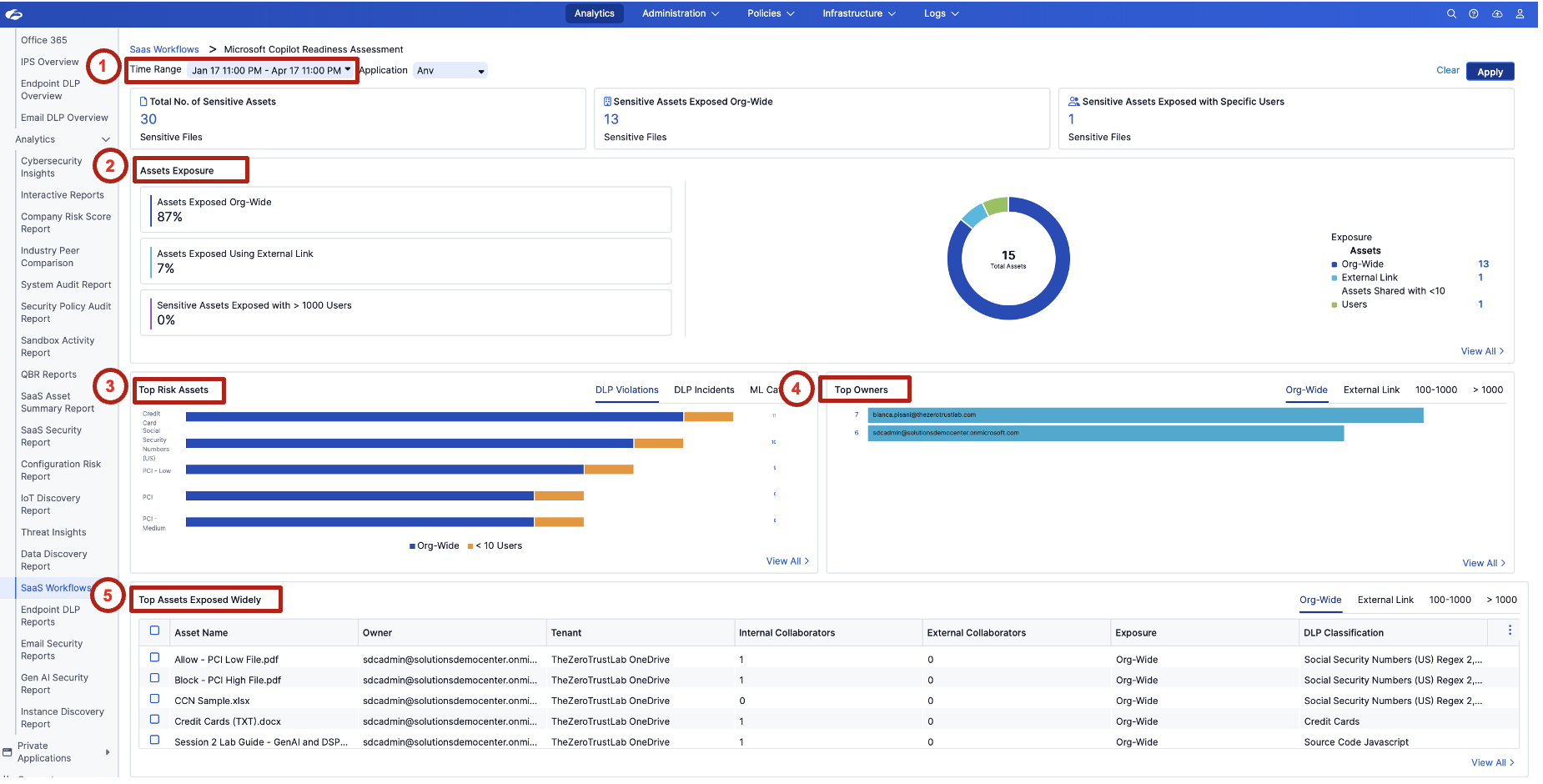
Reinforce that Copilot does not create new permissions — it inherits existing access. If sensitive content is already broadly shared, Copilot can surface it immediately.
Review the Assets Exposure section. Observe the exposure categories:
- Assets Exposed Org-Wide
- Assets Exposed Using External Link
- Sensitive Assets Exposed with > 1000 Users
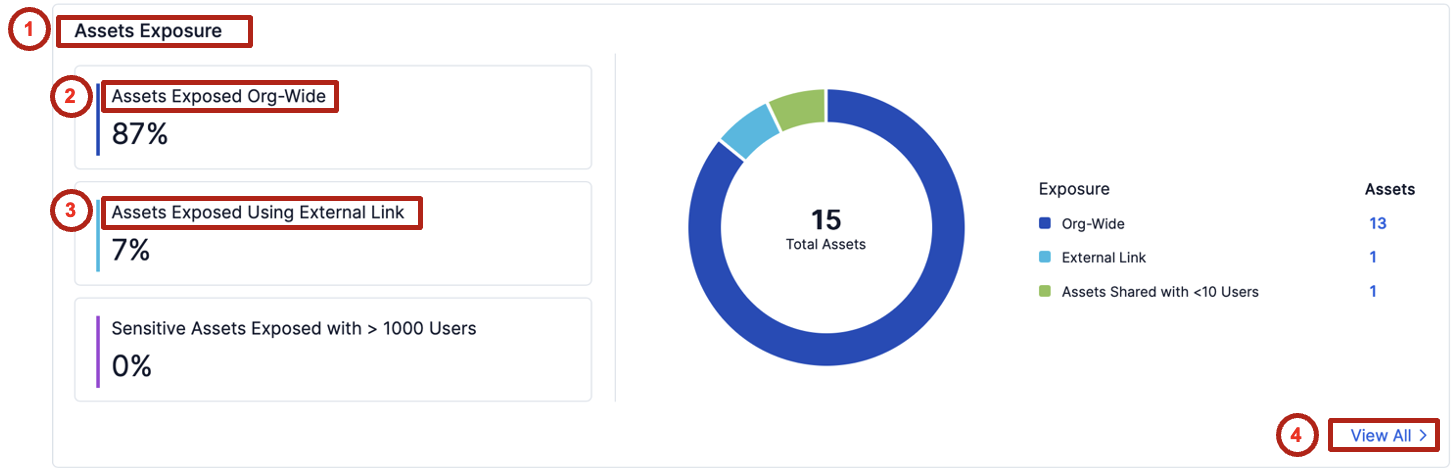
This is the key readiness signal. The broader the sharing, the greater the chance Copilot can retrieve and summarize sensitive content for unintended users.
2. Review All Exposed Sensitive Assets
Identify which specific files are exposed and understand what remediation actions may be needed before enabling Copilot.
In the Assets Exposure section, click View All.
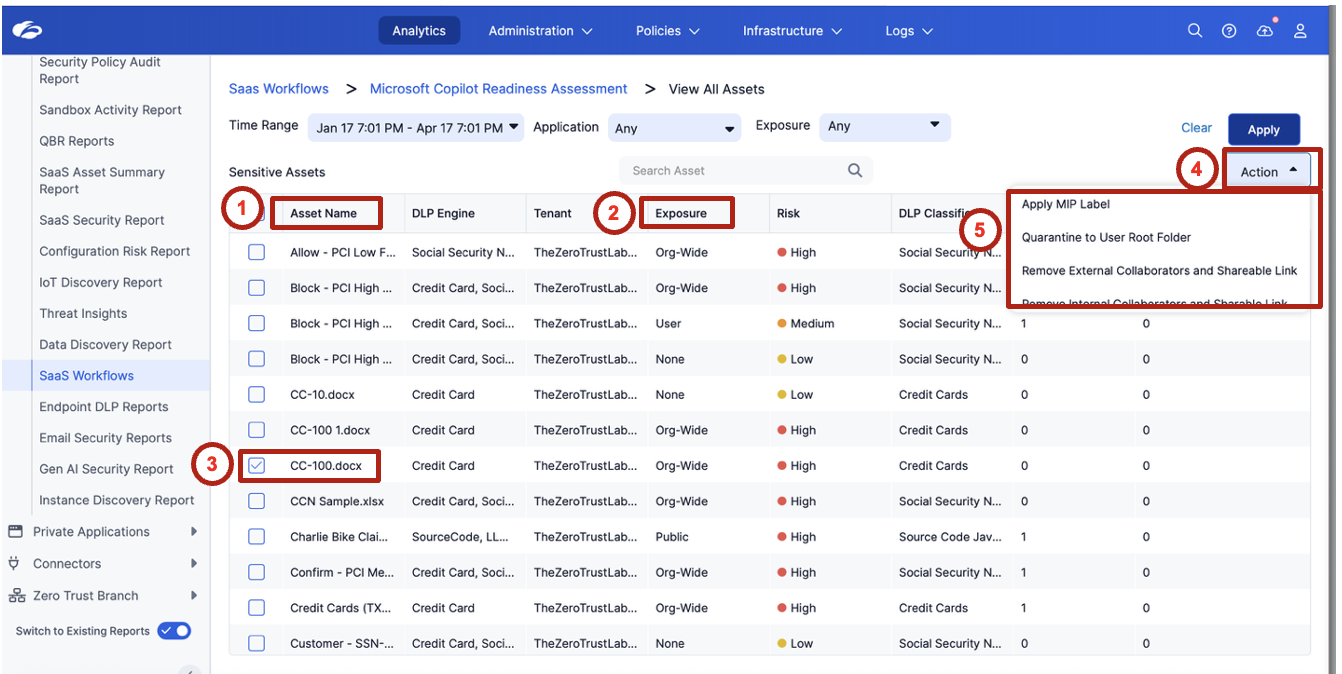
Review the list of exposed sensitive assets. Focus on:
| Field | What to look for |
|---|---|
| Asset Name | Recognizable sensitive filenames (payroll, financial, HR) |
| Owner | Who is responsible for this file |
| Tenant | OneDrive vs. SharePoint |
| Internal Collaborators | How many internal users have access |
| External Collaborators | Any external sharing |
| Exposure | Org-Wide / External Link / Limited |
| DLP Classification | What sensitive data type was detected |
Ask attendees which file they would investigate first based on filename, exposure level, and data classification. This mirrors a real analyst triage decision.
Select one or more assets and review the available remediation options. Example action: Apply MPIP label.
Readiness is not just about visibility. It is about reducing exposure before Copilot is deployed.
Navigate back to the dashboard by clicking Microsoft Copilot Readiness Assessment in the breadcrumb.

3. Investigate Top Risk Assets
Determine which sensitive data types represent the highest potential risk if Copilot is enabled.
In the Top Risk Assets widget, click the data type with the highest count (for example, Credit Card).
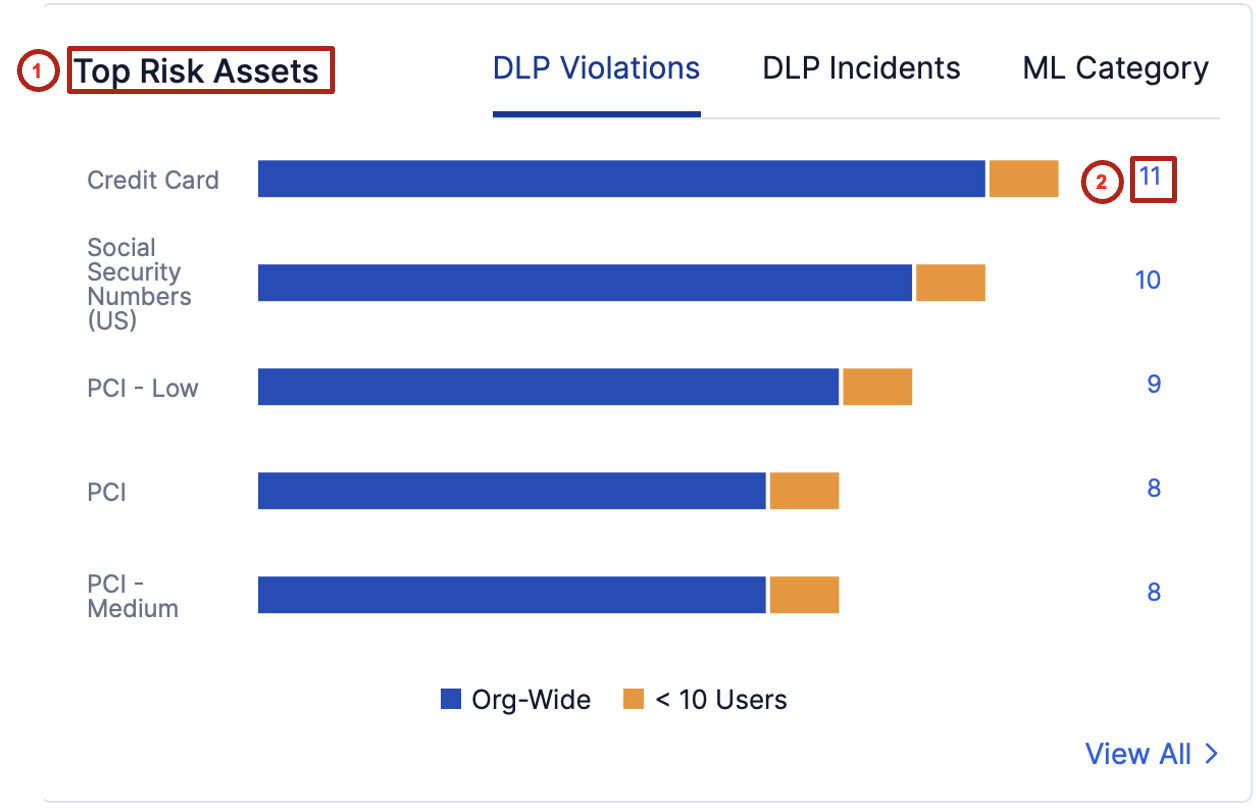
Review the assets associated with that sensitive data category. Identify:
- Where the files are stored (OneDrive or SharePoint)
- Who owns the files
- How the files are shared
- Whether they are exposed Org-Wide, via External Link, or to a limited set of users
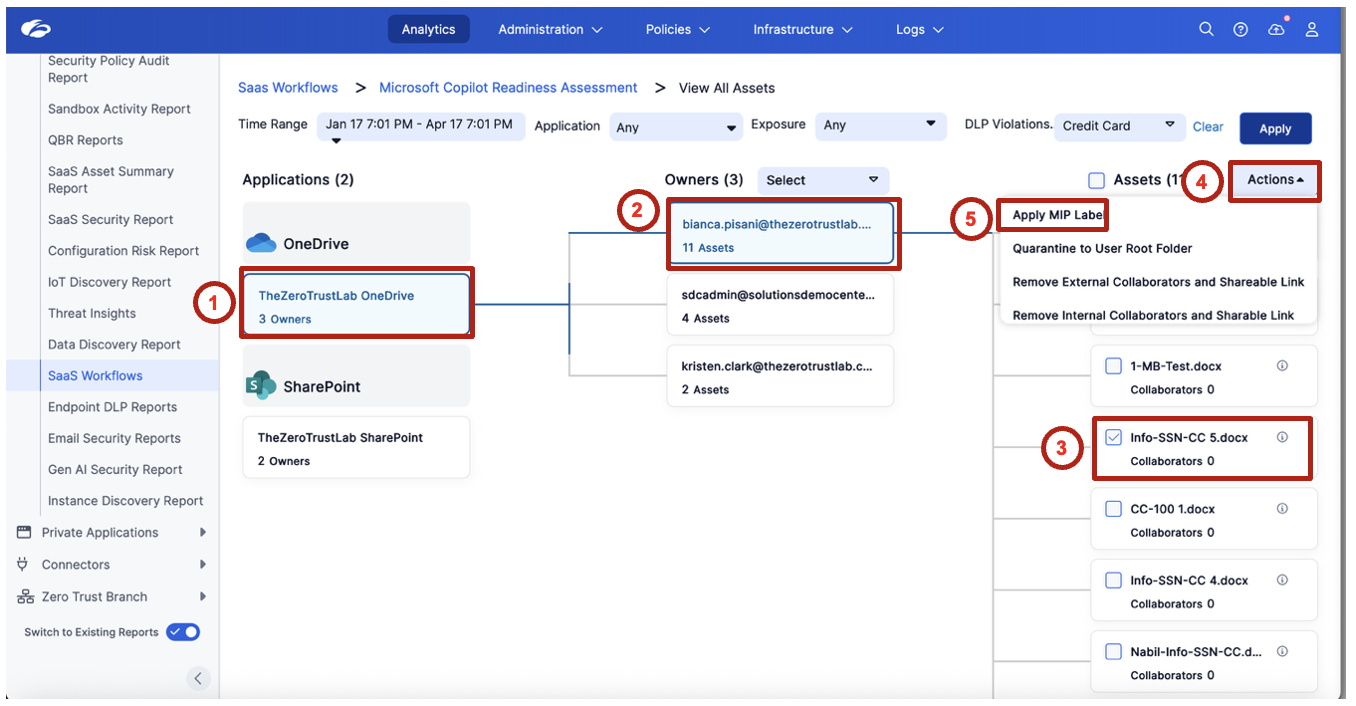
This moves security teams from high-level visibility into actionable investigation — not just "how many sensitive files exist" but "which specific files, owned by whom, shared how."
4. Review Top Owners of Exposed Sensitive Data
Identify which users own the largest amount of broadly exposed sensitive content.
Review the Top Owners widget. Focus on the Org-Wide tab first. Observe which users are associated with the most exposed sensitive assets and consider whether the sharing pattern looks intentional, excessive, or risky.
Emphasize that owner-based visibility helps security teams drive remediation conversations with the right users — not a broad "everyone needs to fix their sharing" message, but a targeted "these five owners account for 80% of the exposure."
5. Validate Copilot Readiness Risk
Connect sensitive data exposure to Copilot deployment risk.
Return to the dashboard and summarize the findings:
| Question | Your finding |
|---|---|
| How many sensitive assets were discovered? | |
| How many are exposed org-wide? | |
| Are any exposed through external links? | |
| Which data types appear most often? | |
| Which owners are associated with the highest risk? |
Discuss why this matters before enabling Microsoft Copilot:
- Copilot can index and retrieve content based on the user's existing access
- Broad sharing increases the chance of unintended data exposure
- Sensitive content should be reviewed and remediated before AI rollout
- If Copilot inherits existing permissions, what happens when sensitive files are shared org-wide?
- Which is the bigger risk in your environment: org-wide sharing or external links?
- Should every sensitive asset be relabeled, or should the first focus be on reducing broad access?
- What remediation steps should be completed before enabling Copilot for end users?
Copilot readiness starts with data access hygiene.
Microsoft Copilot will only be as secure as the permissions and sharing posture that already exist in Microsoft 365. Before deploying Copilot, security teams should identify sensitive content, understand how it is shared, and reduce unnecessary exposure.
This lab closes Module 1 — Visibility. The payoff line: "We can now see every app (Lab 1), every SaaS posture gap (Lab 2), every sensitive file at rest (Lab 3), and every AI readiness risk (Lab 4). Module 2 is about what we do about it."
If the Dataparity payroll file (Dataparity_Q2_2025_Payroll_Report.docx) appeared in the exposed assets list during Lab 3 or this lab, use it as the thread that connects to Labs 6 and 9.